
So far, we have learned about writing input and getting output via the command lines. Next, we can start looking at the Graphical User Interface (GUI), graphical components (e.g. buttons, list, windows), to interact with easy to use visual presentations for the websites or applications.
Java made advancements in 1995 by introducing GUI libraries. In GUI libraries, there are two main packages; older version java.awt packages and the newer version javax.swing packages. In general, if the class name starts with “J” then it is known as a swing package. Both packages will allow us to create GUI objects, such as buttons, windows, scroll bars, ….etc.
Java.awt (Abstract Window Toolkit) package contains the main classes for GUI components like TextField, list, label, bottom, container (different look for the different operating platforms; Windows, MAC OS, etc.). The container is a component as we highlighted and those could be such as window, panel, frame, or dialog. Container means a component can contain another component; It helps to hold more GUI components.
Java.swing package contains most of the visible GUI components such as JButton, JTextField, JTextArea, JRadioButton, JCheckbox, JMenu, JColorChooser etc. There are certain functionalities that are duplicated within both packages, such as frames, buttons, and etc. It is recommended to use swing components rather than awt components if it has the same functionality.
There is a class hierarchy of components that needs to be followed. The following figure shows in a graphical format.

Some of the important terms to know:
Container: It is a space where components are placed (button, textfield, textures, list, …etc.)
Components: It is a visual control that is placed in a container.
Layout: It is an arrangement of components within the container.
Panel: It helps to organize the components onto a window.
Frame: It is a fully functioning window with its title and icons.
Dialog: It is a pop-up window that pops out when a message has to be displayed.
The most used swing containers are;
JWindow
JFrame
JPanel
JDesktopPane
JInternalFrame
JDialog
The most used swing components are;
JOptionPane
JTextField
JLabel
JPasswordField
JTextArea
JRadioButton
JCheckBox
JComboBox
JSpinner
JProgressBar
JScrollPane
JList
JButton
JTable
JSplitPane
JTree
JFileChooser
JColorChooser
JMenuBar
JMenu
JMenuItem
JPopupMenu
JToolBar
JToggleButton
JEditorPane
JSlider
JSeparator
Example 1: Creating a frame, message and image label (picture)
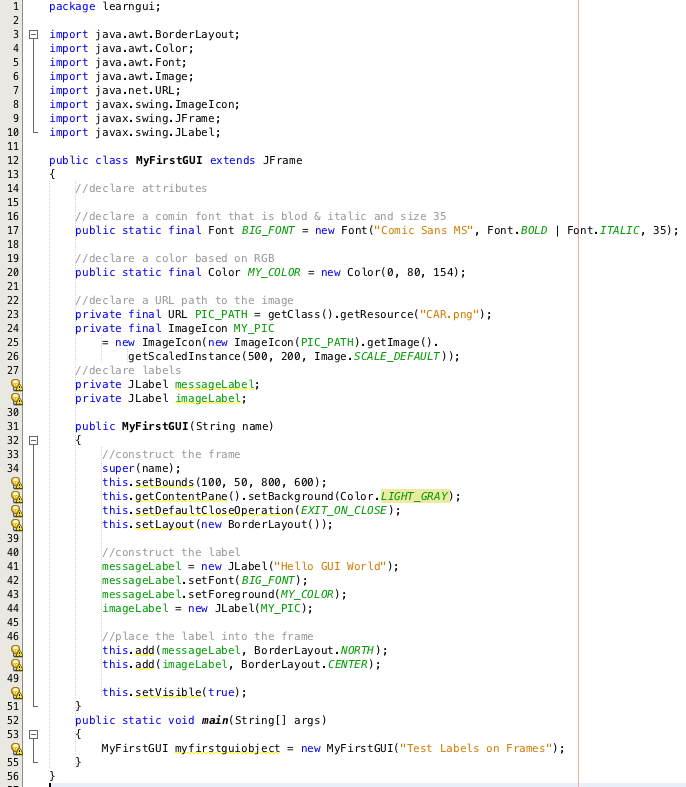
After you run the program, you will get the following window as an output.

Here you go!!! You got your first GUI. I hope you have a basic understanding of Graphical User Interface (GUI) now. In the coming post, I will write step by step how to create a basic GUI so you can start utilizing different containers and components functionalities.
 123 CODING WITH ME